How Childcare Centers Can Speed Up Attendance Check-Ins Without Sacrificing Accurate Records
Introduction
Drop-off time is one of the busiest moments of the day in any childcare center. Children are arriving, parents want to share quick updates, and staff are settling classrooms for the morning. In the middle of all this activity, childcare attendance tracking still needs to be recorded accurately.
For many centers, this is where small delays begin to add up. Staff may need to type notes about where a child is going, who dropped them off, or why they arrived late. When the same phrases are entered over and over again, attendance logging becomes slower than it needs to be.
The good news is that improving attendance workflows does not require complicated systems. Small changes in how documentation is handled can significantly reduce friction during busy check-in periods while still maintaining accurate records.
This guide covers:
- Why attendance documentation often slows teams down during peak hours
- The hidden impact of inconsistent attendance notes on compliance
- Practical ways childcare centers streamline attendance tracking
- How predefined notes reduce repetitive typing without sacrificing accuracy
Why Attendance Documentation Can Slow Staff Down
Attendance tracking is essential for safety, compliance, and communication with families. But the process can become inefficient when it relies on repetitive manual input.
Many childcare teams encounter similar challenges that create unnecessary friction during the busiest parts of their day.
Repeating the Same Notes Throughout the Day
Certain attendance notes appear constantly in childcare settings. Staff document the same information dozens of times each day, especially in larger centers.
Common attendance notes that get repeated:
- Outdoor play
- Gym time
- Leaving early
- Doctor's appointment
- Late arrival
- Parent pickup
- Bus pickup
- Art room
- Dropped off by grandparent
When staff members type these phrases manually for every child, every transition, the time spent on routine documentation adds up quickly. A note that takes 10 seconds to type becomes 5 minutes when entered 30 times throughout the day.
Busy Check-In Periods Create Bottlenecks
Morning drop-off often happens in waves. Between 7:30 and 8:30 AM, most families arrive within the same narrow window. When multiple children arrive at once, even small delays while typing notes can slow down the entire check-in process.
What happens during peak arrival times:
- Multiple families waiting at the check-in station
- Staff dividing attention between greeting families and logging attendance
- Delays compound as each check-in takes longer than expected
- Parents become frustrated waiting in line
- Staff feel rushed and may skip documentation to keep things moving
This creates a difficult choice: maintain thorough documentation or keep the line moving smoothly. Centers shouldn't have to choose between accurate records and efficient operations.
Shared Devices Become Bottlenecks
Many classrooms use shared tablets or kiosks for childcare check-in systems. A dedicated kiosk mode lets parents check in their own children with a simple PIN, freeing staff entirely. When staff need to type detailed notes for each child, the device can become a bottleneck during busy moments.
Only one person can use the device at a time. While one staff member is typing attendance notes, others are waiting to record their own check-ins. This creates unnecessary delays when multiple staff members need to document attendance simultaneously.
Inconsistent Documentation Across Staff
When everyone types notes manually, the wording often varies. One staff member may write "Dr appt," another writes "Doctor appointment," and another writes "medical visit." Over time, this makes records harder to review and interpret.
Examples of inconsistent documentation:
- "Left early" vs "Early pickup" vs "Leaving early"
- "Outside" vs "Outdoor play" vs "Playground"
- "Gym" vs "Gymnasium" vs "Gross motor room"
- "Late" vs "Late arrival" vs "Arrived late"
This lack of standardization creates problems that extend beyond the immediate moment of check-in.
The Hidden Impact of Inconsistent Attendance Notes
Attendance records are not only used in the moment. They often serve as documentation that may be reviewed later by administrators, regulators, or parents.
Inconsistent notes can create several challenges that affect compliance, efficiency, and communication.
Harder Record Reviews and Reporting
When notes are written in different ways across classrooms, it becomes harder to quickly understand attendance history. Administrators reviewing attendance patterns need to mentally translate different phrasings of the same concept.
Challenges with inconsistent records:
- Difficulty identifying attendance trends or patterns
- Extra time needed to interpret what notes actually mean
- Harder to generate accurate reports from attendance data
- Confusion when multiple staff describe the same situation differently
If you're trying to track how many children left early for appointments last month, you need to search for "Dr appt," "Doctor appointment," "medical visit," "dentist," and every other variation your team might have used.
Reduced Clarity During Licensing Audits
Clear documentation helps demonstrate that childcare centers maintain accurate records. Childcare compliance reporting requires attendance documentation that is complete, accurate, and interpretable.
Abbreviations or inconsistent phrasing can make records harder to interpret during compliance reviews. When a licensing inspector reviews your attendance logs, they should be able to clearly understand what happened and when.
Questions auditors may ask about attendance records:
- Can you demonstrate accurate arrival and departure times?
- Are attendance records complete and consistent?
- Can staff explain what abbreviations or shorthand mean?
- Are records kept in a format that supports compliance verification?
Standardized documentation makes these conversations straightforward rather than requiring extensive explanation or interpretation.
Extra Administrative Work
Administrators often need to review or interpret attendance notes later when responding to parent questions, preparing reports, or addressing billing concerns. When documentation is inconsistent, that process takes significantly longer.
Administrative tasks affected by inconsistent notes:
- Responding to parent questions about their child's day
- Preparing attendance reports for boards or funders
- Verifying billing accuracy based on attendance records
- Investigating incidents or concerns that require attendance context
- Creating attendance summaries for parent communication
Standardizing how attendance notes are recorded can make a significant difference in both daily efficiency and long-term administrative burden.
How Childcare Centers Streamline Attendance Tracking
Many centers are now looking for ways to simplify attendance documentation while keeping records reliable and clear. The goal is not to reduce the quality of documentation—it's to remove unnecessary friction from a task that happens constantly throughout the day.
A few practical approaches can help childcare centers achieve faster, more accurate attendance tracking.
Standardize Common Attendance Notes
Most childcare centers repeatedly document the same types of information. Defining a standard set of notes helps keep records consistent across staff members and classrooms.
Steps to standardize attendance notes:
- Identify your most common attendance scenarios. Review the past month of attendance notes and identify which phrases appear repeatedly.
- Create a list of standard terms. Work with your team to agree on consistent language for common situations. Use clear, specific wording that everyone understands.
- Train staff on standard terminology. Make sure everyone knows which terms to use and when. Consistency only works when the whole team is aligned.
- Review and refine over time. As your center's needs change, update your standard notes to reflect new programs, rooms, or situations.
Even without digital tools, standardizing terminology improves record clarity and reduces confusion.
Use Digital Attendance Systems
Digital attendance for daycare helps capture accurate timestamps and keep records centralized. This reduces reliance on handwritten notes and scattered documentation across clipboards, sign-in sheets, and paper forms.
Benefits of digital check-in systems:
- Automatic timestamps for every arrival and departure
- Centralized records accessible to authorized staff
- Reduced risk of lost or illegible documentation
- Easier record searching and reporting
- Better integration with billing and parent communication
Digital systems don't just replace paper—they create new possibilities for streamlining workflows that weren't feasible with manual processes.
Reduce Unnecessary Typing
The less time staff spend typing routine information, the faster attendance can be recorded during busy transitions. Every second saved on repetitive documentation adds up throughout the day.
Ways to minimize typing during check-in:
- Use quick-select options for common notes
- Pre-configure standard labels for frequent scenarios
- Enable staff to tap rather than type whenever possible
- Reserve custom text entry for truly unique situations
Even small workflow improvements can make a noticeable difference throughout the day, especially during peak arrival and departure times.
Using Predefined Attendance Notes to Speed Up Check-Ins
One effective way to reduce repetitive typing is to use predefined attendance notes. This approach combines the benefits of standardization with practical time savings during busy periods.
How Predefined Notes Work
Instead of entering the same phrases repeatedly, staff can select from a list of commonly used labels during check-in and check-out. The note is applied instantly with a single tap, eliminating the need to type.
Example predefined notes for childcare centers:
- Art Room
- Outdoor Play
- Gym
- Music Room
- Leaving Early
- Bus Pickup
- Parent Pickup
- Grandparent Pickup
- Doctor's Appointment
- Late Arrival
- Field Trip
- Sick Day
- Holiday
These labels appear as quick-select options during attendance actions. Staff simply tap the appropriate label, and the note is added to the child's attendance record instantly.
Benefits of Predefined Attendance Labels
This approach keeps attendance documentation fast while ensuring that records remain clear and consistent across the team.
Advantages for childcare operations:
Speed: Tapping a predefined label takes 1-2 seconds compared to 10-15 seconds of typing. During busy check-in periods with 20-30 arrivals, this saves several minutes that staff can spend welcoming families instead.
Consistency: Everyone uses the same terminology. When all staff select "Outdoor Play" instead of typing variations like "outside," "playground," or "outdoor time," records become immediately more useful.
Accuracy: Pre-configured labels reduce typos and misspellings. "Doctor's Appointment" is always spelled correctly and formatted consistently.
Ease of use: New staff can use the system immediately without learning which phrases to type or how to abbreviate common situations.
Better reporting: Standardized labels make it easy to filter, search, and analyze attendance data. You can quickly answer questions like "How many children left early last week?" or "Which days had the most late arrivals?"
Flexibility When Needed
Predefined notes don't eliminate the ability to add custom information. Staff can still type unique notes whenever something specific needs to be recorded that doesn't fit the standard options.
When to use custom notes:
- Specific parent instructions for pickup
- Unusual circumstances requiring explanation
- One-time situations that won't recur
- Details that provide important context
The goal is to use predefined notes for the routine 80% of documentation while preserving flexibility for the exceptional 20% that requires custom explanation.
How KidzLog Implements Predefined Attendance Notes
KidzLog includes predefined attendance notes as part of its childcare attendance software system. This feature is designed to support real classroom workflows during the busiest moments of the day.
Administrator Configuration
Center administrators can configure the labels their team uses most often. This customization ensures the predefined notes match your center's specific programs, rooms, and common situations.
Configuration capabilities:
- Create custom labels that match your center's terminology
- Organize labels by category (locations, pickup types, reasons for absence)
- Enable or disable labels as programs and needs change
- Set different label options for different classrooms or age groups
Where Predefined Notes Appear
Once configured, predefined labels appear automatically during attendance actions throughout the system:
Check-ins and check-outs: Staff see predefined note options when recording individual arrivals and departures
Bulk attendance updates: When checking in or out multiple children at once (such as when a group returns from a field trip), the same predefined notes are available
Kiosk mode: Parents using self-service kiosks can select from relevant predefined notes when checking their children in or out
Mobile access: Staff using tablets or phones in different locations (playground, gym, field trip) can apply predefined notes from anywhere
This consistency across all attendance entry points means staff don't need to remember different processes for different situations.
Maintaining Documentation Quality
Using predefined notes doesn't mean sacrificing detail or accuracy. It means documenting routine information efficiently so staff can focus attention on situations that truly require custom explanation.
Documentation remains complete:
- Accurate timestamps captured automatically
- Predefined notes provide clear context
- Custom notes available when needed
- All information centralized in child's attendance record
- Records accessible for reporting and compliance verification
Centers maintain the documentation quality they need while removing unnecessary friction from daily workflows.
Why Small Workflow Improvements Make a Big Difference
At first glance, reducing a few seconds of typing may not seem significant. But when attendance is logged hundreds of times each day across multiple classrooms and staff members, small efficiencies quickly compound.
The Math of Time Savings
Consider a medium-sized childcare center with 60 children:
Without predefined notes:
- 60 morning check-ins × 10 seconds typing notes = 10 minutes
- 60 afternoon check-outs × 10 seconds typing notes = 10 minutes
- Various transitions, early departures, late arrivals throughout day = 5 minutes
- Total daily time spent typing routine notes: 25 minutes
With predefined notes:
- 60 morning check-ins × 2 seconds selecting label = 2 minutes
- 60 afternoon check-outs × 2 seconds selecting label = 2 minutes
- Various transitions, early departures, late arrivals throughout day = 1 minute
- Total daily time spent on routine notes: 5 minutes
Time saved: 20 minutes per day
That's nearly 7 hours per month that staff can redirect toward welcoming families, settling classrooms, and focusing on children rather than typing repetitive documentation.
Beyond Time: Operational Benefits
The benefits of streamlined attendance tracking extend beyond raw time savings:
Reduced congestion during drop-off: Faster check-ins mean shorter lines and less waiting for families during peak arrival times.
Staff focused on relationships: When documentation takes seconds instead of minutes, staff can give full attention to greeting children and communicating with parents.
Consistent records across classrooms: Standardized labels ensure that everyone documents attendance the same way, making records easier to review and interpret.
Simplified training for new staff: New team members can use predefined notes immediately without learning which phrases to type or how to abbreviate.
Better data for decision-making: Consistent documentation makes it possible to analyze attendance patterns, identify trends, and make informed operational decisions.
Most importantly, it removes friction from a task that happens constantly throughout the day, allowing childcare teams to focus on what matters most: caring for children.
Making Attendance Tracking Work for Your Team
Accurate attendance records will always be a critical part of childcare operations. Attendance documentation supports safety, compliance, billing accuracy, and communication with families. These requirements won't change.
But the process should support staff rather than slow them down. By standardizing attendance notes and using tools designed for real classroom workflows, childcare centers can maintain clear documentation while keeping daily routines running smoothly.
Key Takeaways
Standardize common notes: Define consistent terminology for attendance situations your team encounters repeatedly. Even without digital tools, standardization improves record quality.
Use digital systems thoughtfully: Choose childcare check-in systems that reduce repetitive tasks while maintaining documentation accuracy and compliance.
Enable predefined labels: Give staff quick-select options for routine documentation so they can focus custom notes on situations that truly require explanation.
Measure the impact: Track how workflow changes affect check-in speed, record consistency, and staff satisfaction. Small improvements often have larger impacts than expected.
Keep flexibility: Predefined notes should handle the routine majority of documentation while preserving the ability to add custom detail when circumstances require it.
Next Steps for Your Center
If your center is looking for ways to simplify attendance tracking and reduce repetitive documentation:
- Audit your current process: Review how long check-ins take during busy periods and identify where delays occur.
- Identify common notes: Look at past attendance records to see which phrases appear most frequently.
- Explore digital solutions: Consider how childcare attendance software could streamline workflows while maintaining or improving record quality.
- Start your free trial: Experience how KidzLog helps childcare teams record attendance quickly and consistently. Visit kidzlog.com to get started.
Efficient attendance tracking isn't about cutting corners—it's about eliminating unnecessary friction so your team can focus on providing excellent care.
Frequently Asked Questions
How do predefined attendance notes improve compliance?
Predefined notes improve compliance by ensuring consistent, clear documentation across all staff members. Instead of varying abbreviations or phrases that might be unclear during an audit, standardized labels create records that are easy to interpret and verify. All attendance documentation includes accurate timestamps and follows consistent terminology that licensing inspectors can easily understand.
Can staff still add custom notes when needed?
Yes. Predefined notes handle routine documentation efficiently, but staff can always add custom text when a situation requires specific explanation. The goal is to use quick-select labels for the common scenarios (outdoor play, leaving early, doctor's appointment) while preserving the ability to document unique circumstances with detailed custom notes.
What happens if we need to change our predefined labels?
Administrators can modify predefined labels at any time to reflect changing programs, new rooms, or updated terminology. When labels are updated, the changes apply to future attendance entries. Historical records remain unchanged, preserving the documentation as it was originally recorded.
How much time do predefined notes actually save?
Time savings depend on center size and how frequently staff document attendance. A typical medium-sized center might save 15-25 minutes daily by reducing typing for routine notes. Over a month, this translates to several hours that staff can redirect toward child care and family communication rather than repetitive documentation.
Do predefined notes work with kiosk check-ins?
Yes. When parents use self-service kiosks for check-in, they can select from relevant predefined notes (such as "Parent Pickup" or "Bus Pickup") just as staff do. This keeps documentation consistent regardless of who performs the check-in while maintaining the speed and convenience that makes kiosk systems valuable.
Ready to streamline your childcare attendance tracking? Start your free 15-day trial at kidzlog.com and experience how predefined attendance notes help your team document faster without sacrificing accuracy.
No credit card required.
Ready to Simplify and Organize your Daycare?
Get started with KidzLog today!
KidzLog Team
Related Articles
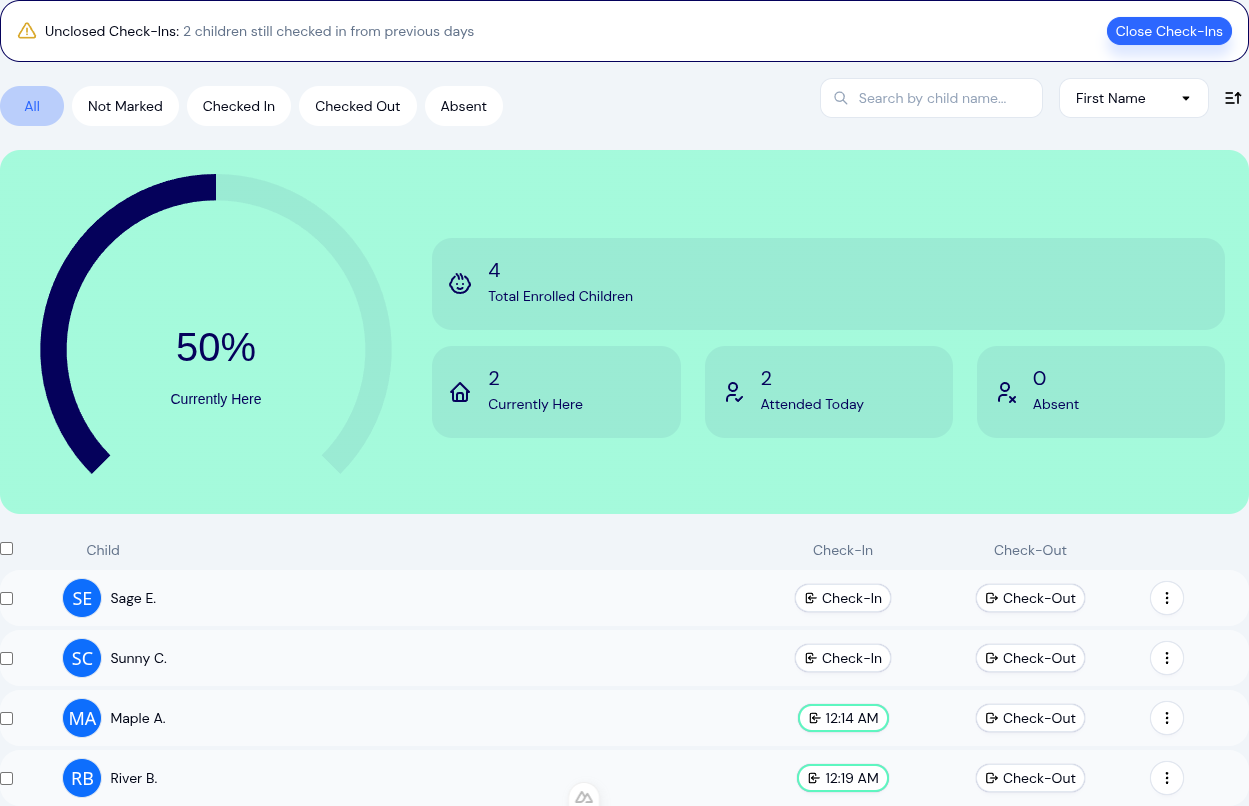
Daycare Attendance Tracking That Actually Saves You Time
KidzLog gives childcare centers a faster way to handle attendance — one-tap check-ins, bulk actions, kiosk mode, and...
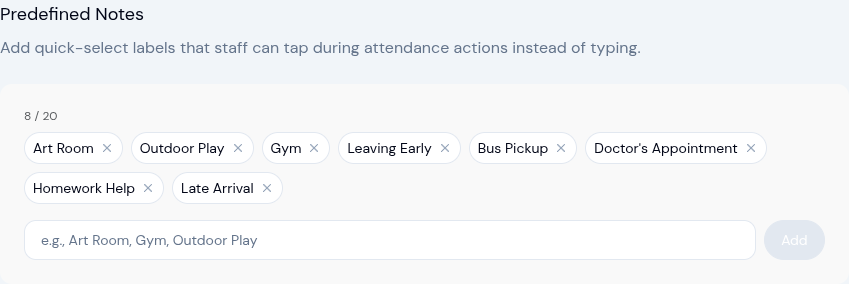
New: Predefined Attendance Notes — Tap Instead of Type
Staff can now select from predefined note labels during check-in, check-out, and other attendance actions — no more...

February 2026 Product Updates: Roll Call, Attendance Upgrades & More
New roll call safety verification, smarter attendance tracking, redesigned enrollment management, and a cleaner...