

New Jersey Unusual Incident Report
For anything that isn't an injury, New Jersey centers file the Office of Licensing's Unusual Incident Report. This is the form that asks whether the incident indicates abuse or neglect, and it carries the State Central Registry Hotline notice in full.
You don't choose it. Report the incident the way you normally would, and when the type is anything other than Injury or Allergic reaction, this is the form that comes out.
When You Get This Form
Two things have to be true:
- Your center's address is in New Jersey. That comes from the state on your Center Profile.
- The Incident Type is Illness, Behavioral, Near-miss, or Other.
An Injury or Allergic reaction at a New Jersey center produces the Accident / Injury Report instead. Centers outside New Jersey get the standard Incident Report.
What Is Not Asked
The standard report insists on Incident Cause, Actions Taken and Where did this incident occur?. This form does not, because the Office of Licensing's document has no box for any of them. You can still fill them in, and whatever you write stays on your center's own copy of the record; you are just not made to. The description, the abuse-or-neglect answer and the reporter's name are still required, since those print.
The Abuse or Neglect Question
This is the part of the form that isn't on any other report, and it's the reason the Office of Licensing publishes it separately.
While you're filling in the incident form, you'll be asked Does the nature of this incident indicate abuse or neglect? It's a required Yes or No, and nothing is pre-selected, so it's a decision you make rather than one you accept by default.
Answering Yes opens a Child abuse hotline report block for recording the call you made:
- Name / ID of hotline screener — who took your call
- Date of call and Time of call
- Comments — what you reported and anything they told you
What the Filed Report Looks Like
Export Report on the incident opens a print-ready copy in a new tab. See Printing or Saving a Copy for the full steps.
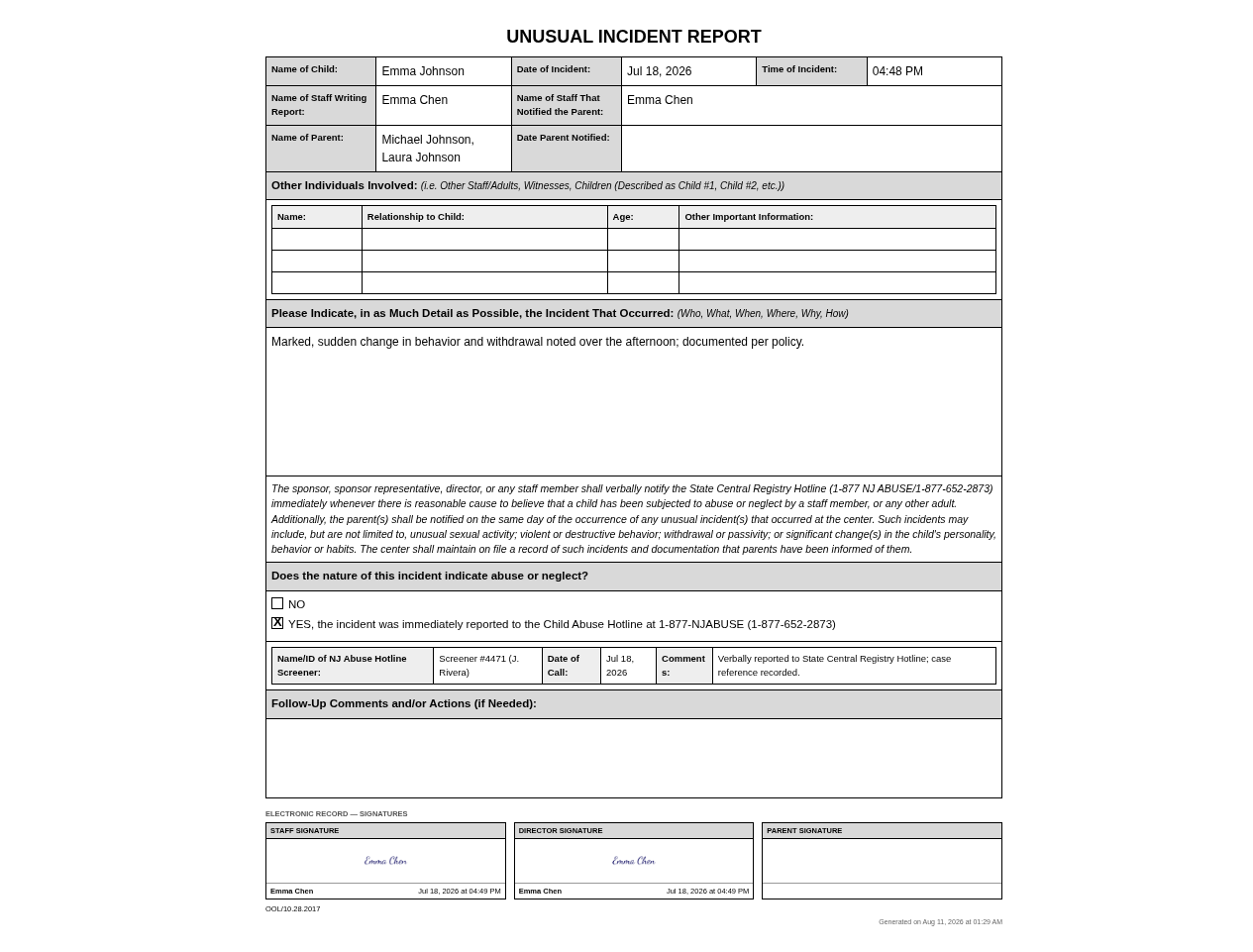
The example above is a report that has been approved but not yet signed by the parent, which is how a report looks when you file it on the day. Name of Parent is already filled in, because it names the child's guardians rather than whoever signs.
The form carries, in order:
- The child's name, the date and time of the incident, the staff member writing the report, and the staff member who notified the parent
- Name of Parent, listing the child's linked guardians, and Date Parent Notified, which fills in once the parent signs the report
- Other Individuals Involved — a four-column grid of Name, Relationship to Child, Age, and Other Important Information, filled in from the Witnesses list on the incident form. It always prints at least three rows, blank ones included, and grows to fit a longer list. The Office of Licensing's own note above the grid asks for children to be described as Child #1, Child #2. Give each child the Child role on the Witnesses list and the parent's copy numbers them that way; your own copy keeps the name you typed
- The incident description, under the Office of Licensing's own prompt asking for the who, what, when, where, why, and how
- The State Central Registry Hotline notice in full
- The abuse-or-neglect answer, and when it's Yes, the hotline screener, date of call, and comments
- Follow-Up Comments and/or Actions
- Signature blocks for staff, director, and parent
- OOL/10.28.2017 in the footer, naming the Office of Licensing form this follows
What the Notice Requires
The notice printed on the form is the Office of Licensing's own wording, and it asks two separate things of you.
Call the hotline immediately when there is reasonable cause to believe a child has been subjected to abuse or neglect by a staff member or any other adult.
Tell the parents the same day any unusual incident happens at the center. The notice gives examples: unusual sexual activity, violent or destructive behavior, withdrawal or passivity, and significant changes in a child's personality, behavior, or habits. It also requires the center to keep the incident on file along with evidence that parents were informed, which is what the parent notification section and the filed report together provide.
Frequently Asked Questions
Yes. The question and your answer are part of the report parents can view and export. The hotline screener name, date of call, and comments are staff-only and are stripped from the parent's copy.
An Injury or Allergic reaction always produces the Accident / Injury Report, which has no abuse question. File a separate report for the safeguarding concern so it lands on this form with the hotline details attached.
Add a row to Witnesses on the incident form for each person, pick their Role (Staff, Child or Other), and record their relationship to the child, their age, and anything else worth noting. Name, relationship, age and the note are the grid's four columns, so whatever you enter is what prints on your copy. Name whoever you need to: what a parent sees of the grid is set separately under Settings → Incidents, and starts at nothing at all. Free text is a different matter — keep other children unnamed in your description, which is never redacted.
Whatever your center has chosen under Settings → Incidents. Until an owner changes it, parents see no rows at all. The middle choice keeps your staff's names, numbers children as Child #1, Child #2 and anyone else as Individual #1, Individual #2, and keeps the relationship and age for each. The third choice shows the grid in full. Your own copy always shows every row. See What parents see of the witnesses list.
Yes. The hotline block records a call you have already made. New Jersey requires verbal notification to the State Central Registry Hotline immediately, and nothing in KidzLog makes that call for you.