

Roll Call Reports
The Roll Call Report lets you review past roll call sessions, track completion rates, and spot children who are frequently unaccounted for during head counts.
How to Access
Open the Reports page
Click Reports in the sidebar navigation.
Click Roll Call Report
Select the Roll Call Report card from the reports hub.
History Tab
The History tab is the default view. It shows a table of all roll call sessions with the following columns:
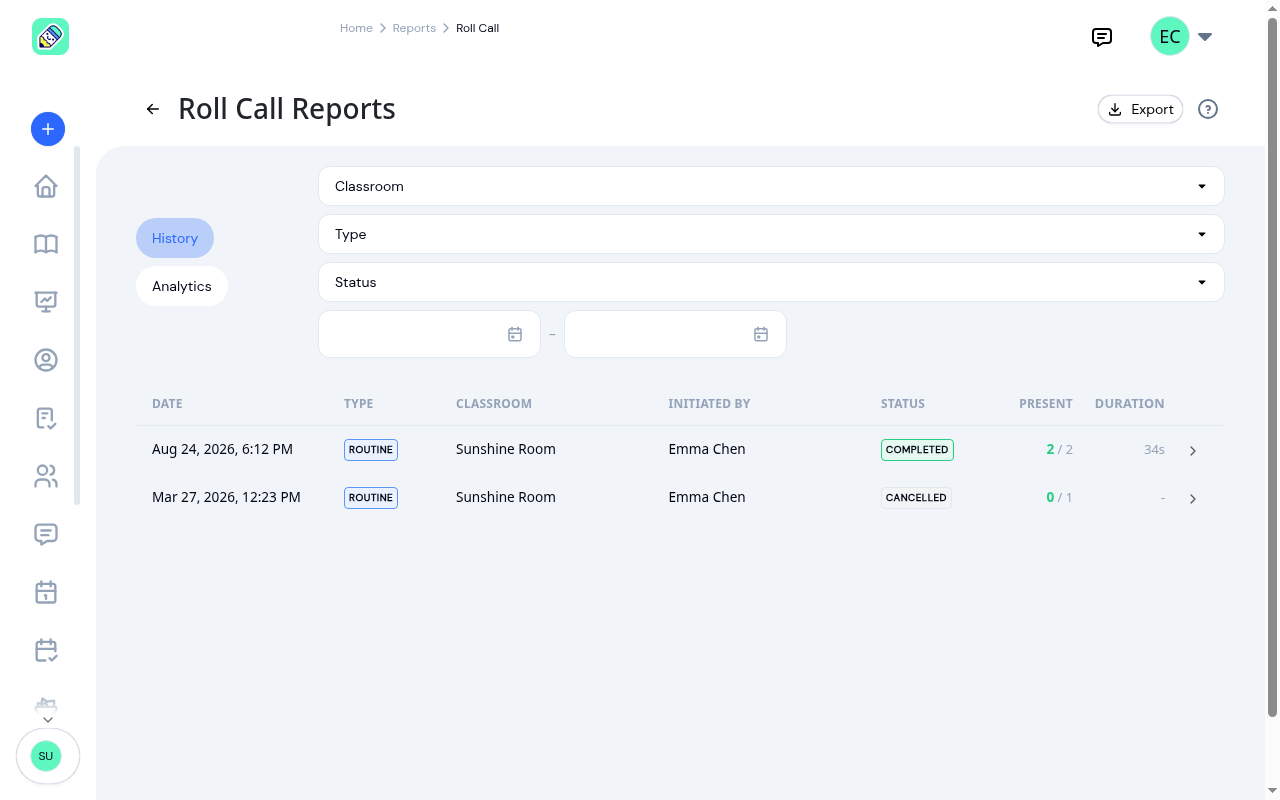
- Date — When the roll call was started
- Type — The type of roll call: Routine, Fire Drill, Excursion, Transition, or Custom
- Classroom — Which classroom the roll call was conducted in
- Initiated By — The staff member who started the roll call
- Status — Completed, In Progress, or Cancelled
- Present — Number of children confirmed present out of the total expected
- Duration — How long the roll call took to complete
Click any row to open the session detail modal, which shows the full list of children and their individual status during that roll call.
Filtering
Use the controls to narrow your results:
- Classroom — filter by a specific classroom or view all. Every classroom at your center is listed
- Type — Filter by roll call type (Fire Drill, Excursion, Routine, Transition, Custom)
- Status — Filter by session status (Completed, Cancelled, In Progress)
- Date range — Set start and end dates to limit the time period
Exporting
Click the Export button (visible in the History tab) to download your roll call data:
- Export CSV — Downloads a
.csvfile - Export PDF — Generates a PDF document
The export includes every session matching your current filters, not just the page in front of you.
Analytics Tab
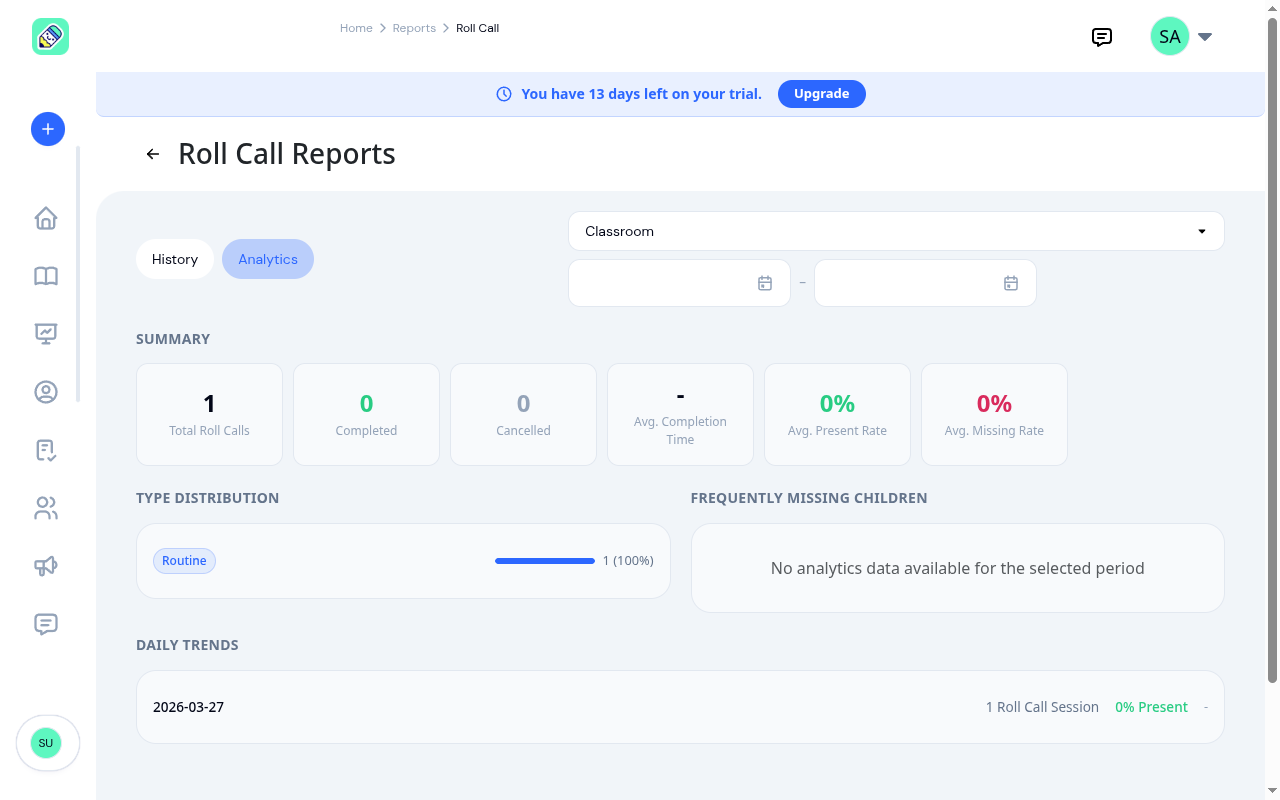
Switch to the Analytics tab for summary statistics and trend analysis.
Summary Cards
- Total Roll Calls — Total number of sessions in the selected period
- Completed — Number of sessions that were completed
- Cancelled — Number of sessions that were cancelled
- Avg. Completion Time — Average time to complete a roll call (e.g., "2m 15s")
- Avg. Present Rate — Average percentage of children marked present
- Avg. Missing Rate — Average percentage of children not accounted for
Type Distribution
A breakdown of roll call sessions by type (Routine, Fire Drill, Excursion, Transition, Custom), showing the count and percentage for each type with a visual progress bar.
Frequently Missing Children
A table listing children who were most often unaccounted for during roll calls. Each row shows the child's name, number of times missing, and their missing rate as a percentage. This helps identify children who may need closer supervision during transitions or drills.
Daily Trends
A day-by-day breakdown showing:
- Number of roll call sessions conducted
- Average present rate
- Average completion time
Frequently Asked Questions
Five types: Routine (daily head counts), Fire Drill (emergency drill practice), Excursion (field trips or outings), Transition (moving between areas), and Custom (any other reason).
The Present column shows how many children were confirmed present out of the total expected. For example, "8 / 10" means 8 of 10 expected children were accounted for during that roll call.
Yes. The Classroom filter applies to both the History and Analytics tabs. Select a specific classroom to see analytics for only that room.