

Notification Settings
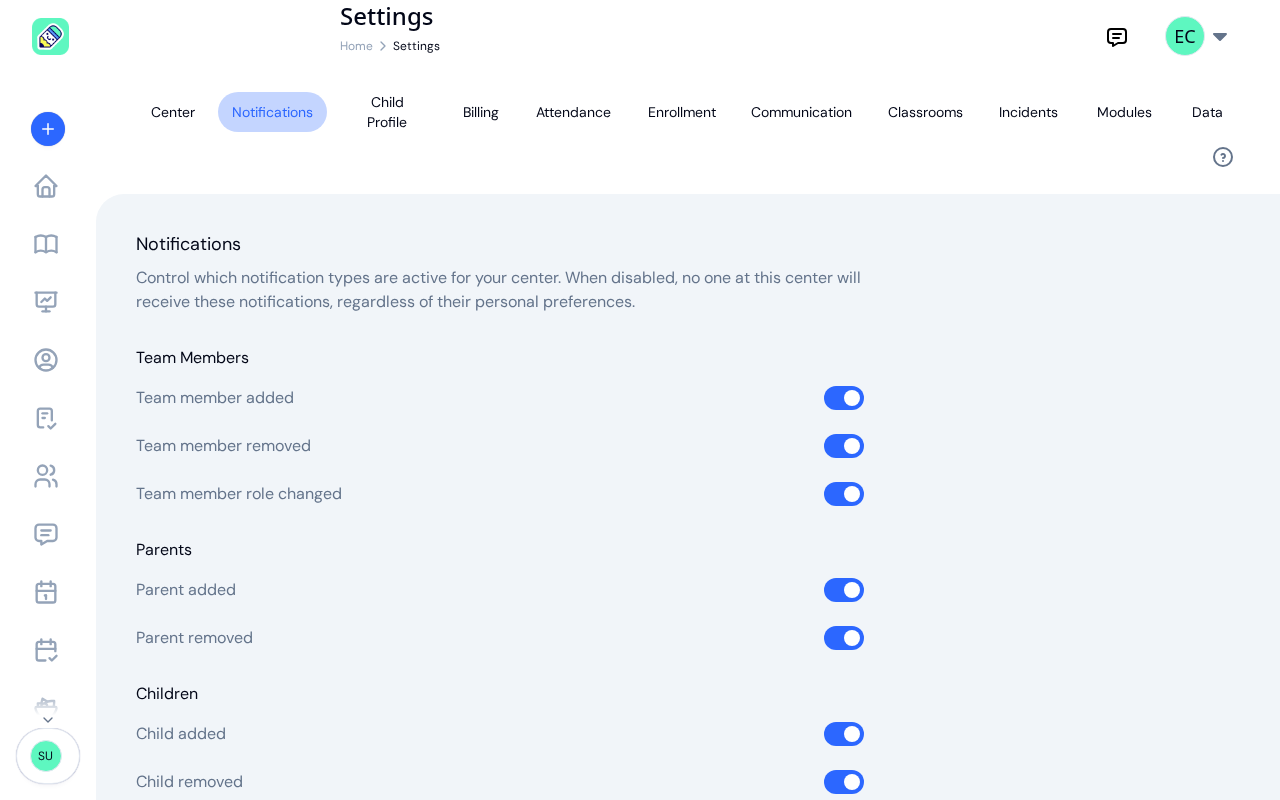
The Notifications tab holds the center-wide master switches for which categories of notifications KidzLog is allowed to send. Turn one off here and nobody at the center receives it, regardless of their personal notification preferences in their own profile.
How to Access
Open Settings from your avatar menu (Owners and Admins only), then click the Notifications tab.
What Each Group Does
The page is organised into eleven groups, in this order: Team Members, Parents, Children, Enrollment, Calendar, Menus, Documents, Capacity, Incidents, Safe Arrival, and Messages. Most toggles are on by default for a new center (the Unsigned incident reminder in the Incidents group is the exception).
Team Members
- Team member added — emails Owners and Admins when a new staff member is invited or accepts an invite
- Team member removed — emails Owners and Admins when a staff member is removed from the center
- Team member role changed — emails Owners and Admins when an existing member's role is updated
Parents
- Parent added — notifies Owners and Admins when a parent is invited and when they accept
- Parent removed — notifies Owners and Admins when a parent is removed from a child
Children
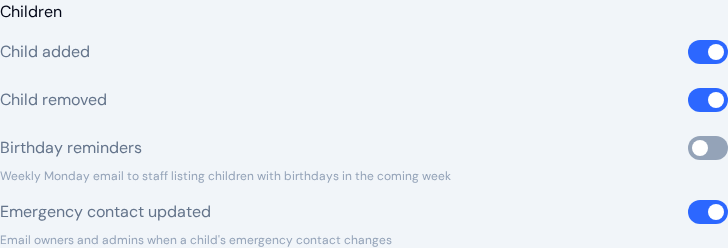
- Child added — notifies Owners and Admins when a new child profile is created
- Child removed — notifies Owners and Admins when a child profile is deleted or archived
- Birthday reminders — sends staff a weekly email each Monday listing the children with birthdays in the coming week
- Emergency contact updated — emails Owners and Admins when a child's emergency contact is added, changed, or removed
The birthday email goes to your team, never to parents. Owners and Admins get a center-wide list of every upcoming birthday. Teachers get a list for their own classrooms only, so each teacher sees just the children they work with.
Enrollment
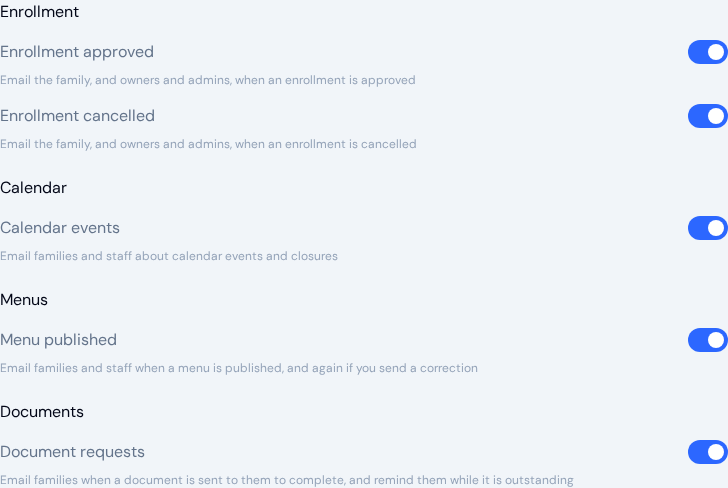
- Enrollment approved — emails the family, and Owners and Admins, when an enrollment is approved
- Enrollment cancelled — emails the family, and Owners and Admins, when an enrollment is cancelled
Calendar
- Calendar events — emails families and staff about calendar events and closures
Menus

- Menu published — Emails families and staff when you publish a menu, and again if you publish a correction to one already sent out
Who gets it depends on the menu's reach. A menu built for specific classrooms goes to the families of children actively enrolled in those rooms, which is the same set of families who can see it in the app. A center-wide menu goes to every family. Your staff are emailed center-wide either way, so teachers see menu changes across the center rather than only for their own room.
Documents
- Document requests — emails families when a document is sent to them to complete, and reminds them while it is still outstanding
Capacity
These two switches are on by default. When a classroom or program fills to its enrolment capacity, KidzLog emails the center's Owners and Admins. You get one email each time a room or program fills up. If enrolment later drops below the limit and then fills again, a fresh email goes out.

- Classroom capacity reached — emails Owners and Admins when a classroom fills to its enrolment cap
- Program capacity reached — emails Owners and Admins when a program fills to its enrolment cap
Like every category here, these also respect each person's own profile preferences: an Owner or Admin who has switched the capacity alert off in their profile won't receive it even while the center switch is on.
Incidents
This group controls the emails parents receive about incident reports.
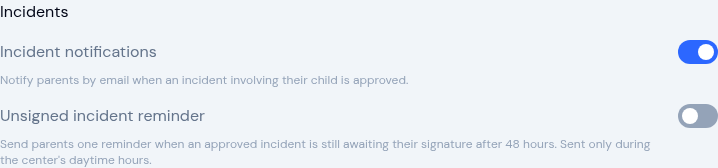
- Incident notifications — Emails parents when an incident involving their child is approved. On by default. Turn it off and no incident emails go to parents from this center.
- Unsigned incident reminder — Sends parents one reminder when an approved incident is still awaiting their signature after 48 hours, sent only during the center's daytime hours. Off by default.
Parents also have a matching personal switch, Notify me when an incident is logged for my child, under their own Profile → Notifications. As with every category, a parent who turns it off there won't receive the emails even while the center switch is on.
Safe Arrival
This group controls the emails your team gets about children who haven't been accounted for by the time the morning check-in window closes.

- Safe arrival alerts — Emails Owners and Admins when enrolled children have not been checked in, checked out, or marked absent by the time the check-in window closes. On by default.
The optional alert to parents about their own child depends on this switch too, so turning it off here silences the whole Safe Arrival email chain for the center.
Owners, Admins, and parents each have a matching personal switch, Notify me about Safe Arrival alerts, under their own Profile → Notifications, so an individual can opt out even while the center switch is on.
Messages
This group controls the emails recipients get about conversation messages.

- Message notifications — Emails the recipient when they receive a new conversation message. On by default. Turn it off and no message emails go out from this center, no matter who is involved.
Each person also has a matching personal switch, Notify me of new messages, under their own Profile → Notifications. Turning the center switch off suppresses message emails for everyone; leaving it on still lets individuals opt out in their own profile.
Links in Notification Emails
Each notification email links to the thing it is about, such as the announcement, message, event, menu, incident report, document, enrollment, application, child, or invoice. The link opens it in the center it belongs to: someone who belongs to more than one center is switched to the right one, and someone who is signed out signs in and lands on that page rather than on their dashboard.
The manage your notification preferences link at the bottom of every email opens the reader's own notification settings: Your Profile for staff and Parent Settings for parents.
Announcement text messages are the exception. They end with a link to KidzLog itself rather than to the announcement.
Which Parents Actually Receive an Email
For every category on this page, a parent has to have accepted their invitation and have a KidzLog login before they are emailed. A parent you have added to a child but never invited, or invited and who has never accepted, is not a recipient. They have no account, so there is nowhere for their personal notification preferences to live and no way for them to opt out.
This is worth knowing before you switch a category on: turning it on doesn't reach families who are still sitting on an unaccepted invitation.
You can see where each family stands on the Parents page, where the badge next to a parent's name reads:
- Active — has accepted and has a login. This is the only state that receives notification emails
- Invited — has been sent an invitation but hasn't accepted it yet
- PIN Only — uses a kiosk PIN, with no email account
- No Access — has no email, PIN, or login set up
Center Switches vs. Personal Preferences
These are center-wide master switches — they decide whether KidzLog can send a category at all. Each user also has their own per-notification toggles under Profile → Notifications, which they use to opt out of categories they personally don't want to receive.
The logic is one-way: turning a category off here suppresses it for everyone, but turning it on still lets individual users opt out via their own profile. Personal off always wins.
Saving
Click Save at the bottom of the page. A success message confirms the change. The change applies going forward. KidzLog won't send or hold back notifications for things that already happened before you saved.
Related
- For per-user notification toggles, see Your Profile and Parent Settings.
- For turning Safe Arrival on and setting the deadline it works from, see Attendance Settings.
- For SMS-on-announcement, quick SMS, and the role-based SMS permission matrix, see Communication Settings.